


Remodel AI - Home Renovation
4.4626.00 Reviews
App Specs
- Version
- 1.6.3+20260825T113724.9c81c2c9.c59e690c
- Updated On
- License
- Free
- Downloads
- 1,000,000+
- Developer
- ReImage AI Inc.
- Categories
- Art & Design
- Platform
- Android, iOS
Screenshots


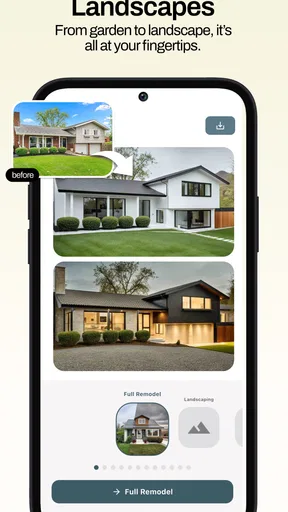

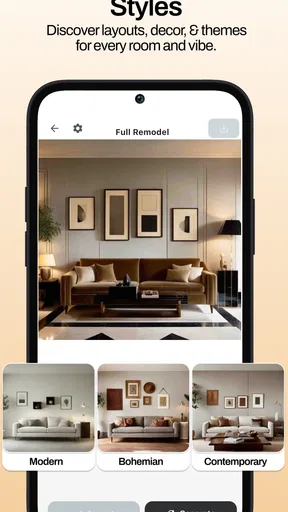
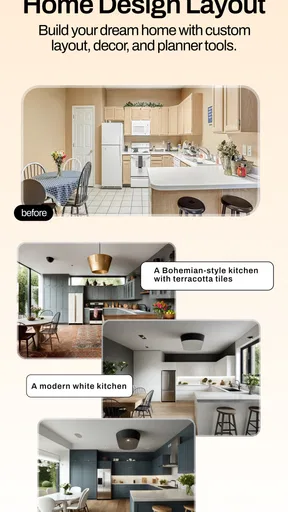
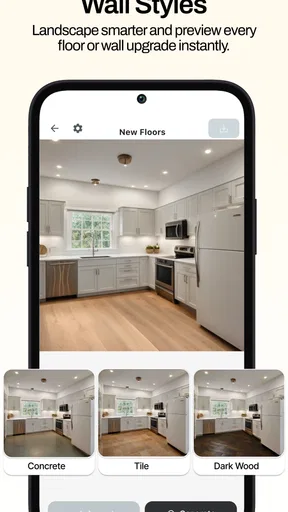
 Analysis by AppCompare
When I’m deciding whether to change a room, the hardest part is often picturing what it could look like without committing to paint, furniture, or a contractor. Remodel AI - Home Renovation is built around that early, uncertain stage: it helps turn a photo of a space into a visual starting point for design ideas. I find that most useful as a way to explore possibilities, not as a substitute for planning the work itself.
Quick ideas, with a little patience
Remodel AI is a free art and design app from ReImage AI Inc., and it focuses on visual concepts for interiors, exteriors, and home remodeling. The basic appeal is easy to understand: instead of trying to imagine a new look from a paint swatch or a mood board, you can work from an image of the actual space. The app has a 4.6 average from around 27,000 ratings, and more than a million installs, so it has found an audience among people looking for this kind of visual help.
I would still approach its speed with sensible expectations. Generating an AI design involves more than opening a static gallery, and the experience may depend on the photo and the work being processed. I’d use it when I have a few minutes to compare ideas, rather than expecting it to replace a quick search for reference images. A clear, well-lit photo gives the app a more useful starting point than a dark, cluttered shot, and it also makes the results easier to judge.
How to get more useful concepts
For a first pass, I’d take a photo from a corner or doorway that shows as much of the room as possible. Keep the camera roughly level and avoid framing the image around a single chair or lamp if the goal is to rethink the whole space. This is a practical trade-off: a wider view gives the AI more context, but small details may become less prominent in the resulting concept.
I also recommend testing one kind of change at a time. If you’re exploring wall colors, keep the broader style direction steady; if you’re comparing styles, don’t judge each result as though every piece of furniture will be available or fit your exact measurements. Separating those experiments makes it easier to tell what you actually like. Save or capture the strongest ideas as you go, then compare them side by side instead of relying on memory.
That distinction matters because a convincing image is not a construction plan. A generated layout can help you discuss mood and direction, but it can’t establish whether a sofa will fit through a doorway, whether a wall can be removed, or whether a material suits a high-traffic area. I’d use the app to narrow the brief before measuring, shopping, or speaking with a professional.
When a quick preview earns its place
Imagine you’re considering a refresh before guests arrive, but you don’t know whether the living room needs a softer palette or a more dramatic style. You could photograph it in daylight, try a few distinct directions, and show the most promising concept to someone who shares the space. That conversation is often easier when both people are looking at a concrete image rather than describing “something warmer” in the abstract.
Worth Reading Before You Choose

EA SPORTS FC Mobile 26 Is a Bigger Football Game, but It Takes Time

Flipboard Shows What News Apps Must Do Beyond the Feed

Switching to Android Auto Means Rethinking Your Driving Routine

Google Calendar Makes a Crowded Week Easier to Manage

Ludo King Makes the Most of the Minutes Between Plans

Baby Panda World Brings Quick Play to Modern Phones, but Its Game Library Feels Busy
This is where the app can be more helpful than a generic inspiration board. Those boards offer polished examples, but they may have little in common with your room’s shape, windows, or existing furniture. A photo-based concept brings the discussion closer to your own space. The trade-off is that an AI image may alter or reinterpret details, so I wouldn’t assume that every object or architectural feature has been represented faithfully.
It’s a good fit for renters testing reversible ideas, homeowners collecting directions before a renovation, and DIY-minded people who want a visual prompt before doing their own research. It’s less suitable if you need precise dimensions, a dependable cost estimate, or technical guidance about electrical, structural, or plumbing work. In those situations, measurements and qualified advice matter more than a persuasive preview.
What it does—and what it doesn’t replace
Compared with browsing design photos, the main advantage here is starting with your own room rather than someone else’s finished project. Compared with drawing or room-planning software, the appeal is a quicker visual exploration without having to build a detailed model first. But those alternatives can be better when accuracy is the priority: a floor-plan tool is more appropriate for checking dimensions, while a conventional image editor offers more deliberate control over individual details.
I’d treat the generated result as a conversation piece and a source of direction, then verify the practical decisions separately. If you’re choosing paint, test real samples in the room’s changing light. If you’re considering furniture, measure the room and the item. And if you’re planning substantial work, use the image to explain your taste, not to settle technical questions.
That workflow also helps avoid a common trap: mistaking visual confidence for certainty. A polished concept can make a bold change look effortless, even when the real project involves cost, delivery, installation, or compromises with the existing space. Remodel AI is strongest before those decisions are final, when a few different looks can reveal what you want to pursue.
First Impressions and Getting Started
When I first downloaded Remodel AI - Home Renovation, I was curious about how an app could possibly help with something as hands-on as home renovation. But boy, was I in for a surprise! The app greets you with a sleek, user-friendly interface that’s not just aesthetically pleasing but also super intuitive. Setting up your profile takes seconds, and you’re quickly ushered into a world of endless renovation possibilities.
Features That Stand Out
Now, onto the real meat of the app. What can it actually do? The answer is a lot more than I expected. The app uses cutting-edge AI to visualize different renovation possibilities for your space. All you need to do is upload a photo of your room, and the app does the magic from there.
Here’s a quick breakdown of some standout features:
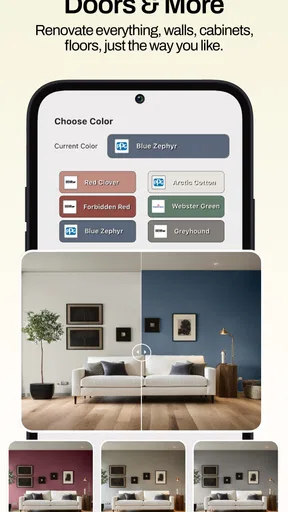
- Virtual Makeover: This feature lets you see how different styles, colors, and layouts will look in your space. It’s like trying on clothes but for your home.
- Style Suggestions: Based on your preferences and existing decor, the app suggests styles that might suit your taste, whether you’re into minimalist chic or boho vibes.
- Shopping Integration: Spotted a piece of furniture you love? The app links you directly to purchase options. It’s seamless and saves a ton of time.
Real-Time Feedback and Community
One feature I didn’t expect to love as much as I did is the community aspect. You can share your designs and get feedback from other users. It’s a bit like having a focus group for your home, and the suggestions are often incredibly helpful.
The app also allows for real-time feedback on designs. You can tweak colors, materials, and layouts on the fly, getting instant visual feedback. It’s an interactive experience that makes you feel like a pro designer.
Using the App in Real Life
Okay, so it sounds great in theory, but how does it hold up in practice? I decided to test it on my living room, which was in dire need of a refresh. After uploading a photo, I played around with various styles. The virtual makeover tool was incredibly accurate, helping me visualize everything from new wall colors to furniture placements.
With a few taps, I had a design I loved, complete with a shopping list for all the items needed to make it a reality. It was like magic! No more second-guessing or endless trips to the store.
The Learning Curve
Now, don’t get me wrong, there’s a bit of a learning curve. If you’re not familiar with tech or design apps, it might take a bit to get used to all the features. But trust me, it’s worth it. The app is designed to be intuitive, and with a little patience, you’ll be navigating like a pro in no time.
Cost, compatibility, and a sensible stopping point
The app is free to install, with in-app purchases ranging from $4.99 to $89.99 per item. I’d explore the free experience first and decide whether the results suit your project before paying for anything. That is especially sensible if you only need inspiration for one room; a one-off visual idea may be enough, while someone comparing several spaces might value a deeper run through the app.
It’s rated for Everyone and requires Android 7.0 or later. The current version is 1.4.2+20260217T093227.fc47c641.3e07a067. Those details make it easier to check whether an Android device can install it, but I’d still leave room for variation in how comfortably it runs on a particular phone. Large photos and repeated design experiments can be more demanding than simply browsing images, so I’d close other heavy tasks if the app feels sluggish and use a suitably clear photo rather than repeatedly uploading near-identical shots.
If a generation stalls or an image doesn’t come out as expected, I’d first check the source photo and try a simpler, better-lit view before changing several design choices at once. That gives you a clearer sense of whether the issue is the image or the direction you’re testing. I wouldn’t treat a single awkward result as proof that the room cannot be redesigned; AI concepts are prompts to refine, not guaranteed predictions.
For heavy use, the most useful habit is to set a question before opening the app: “Would a lighter wall make this room feel calmer?” or “Does a more contemporary exterior suit the house?” A focused question keeps the session productive and makes comparisons meaningful. Endless variations can be entertaining, but they can also leave you with a folder of attractive images and no decision. I’d stop once a couple of concepts have clarified the direction, then move to real measurements and material samples.
Who will get the most from it
I’d recommend it to someone who finds it hard to imagine a finished room from separate swatches and reference pictures, especially when there’s no immediate plan to begin construction. It can also help a couple or household compare preferences without turning an early discussion into an argument over vague descriptions. For people who already know exactly what they want and need precise drawings, it is probably an unnecessary detour; a measured plan or professional consultation will answer their questions better.
Exterior concepts are useful in the same early-stage way: they can help you explore broad visual directions before deciding what to investigate further. But lighting, materials, local conditions, and the actual condition of a building all affect what is practical. I’d never use an attractive exterior image alone to decide on structural changes or purchase materials. The more consequential the project, the more important it is to treat the app as a communication aid rather than an authority.
Final thoughts on performance and purpose
ReImage AI Inc.’s home-design app is at its best when it reduces the blank-page problem: you start with a real space, try a few visual directions, and get something concrete to react to. Its speed is best understood as a convenience for early exploration, not a promise that every idea will appear instantly or match the room exactly. A thoughtful photo and a focused question make more difference than simply generating as many variations as possible.
In conclusion, Remodel AI - Home Renovation is a game-changer for anyone looking to spruce up their living space without the hassle. It’s packed with features that make the process fun, engaging, and surprisingly straightforward. Whether you’re a seasoned DIY-er or just someone looking for a bit of inspiration, this app is definitely worth a try. Who knew home renovation could be this easy and exciting?
Pros
- Easy-to-use interface for quick navigation.
- Offers realistic 3D visualizations of designs.
- Wide variety of furniture and decor options.
- AI suggestions improve design accuracy.
- Fast rendering speeds for quick results.
Cons
- Limited free features without subscription.
- Occasional crashes on older devices.
- Requires a stable internet connection.
- Some design features lack customization.
- High-quality renders take longer to process.
FAQs for Remodel AI - Home Renovation
What is Remodel AI - Home Renovation and how does it work?
Remodel AI - Home Renovation is an innovative app designed to help users visualize home renovation projects. Using advanced AI technology, the app allows users to upload photos of their spaces and apply various design elements, such as new paint colors, furniture, and layouts, providing a virtual preview of potential renovations.
Is Remodel AI - Home Renovation free to use?
The app offers a free version with basic features, allowing users to explore and apply simple design changes. For more advanced options, such as premium design templates and unlimited project saves, users can opt for in-app purchases or a subscription model, providing a more comprehensive experience.
What devices are compatible with Remodel AI - Home Renovation?
Remodel AI - Home Renovation is available for both Android and iOS devices. It supports a wide range of smartphones and tablets, ensuring users can access their renovation projects on the go. Regular updates ensure compatibility with the latest operating systems and devices, enhancing user experience.
Do I need to have design experience to use Remodel AI?
No prior design experience is necessary to use Remodel AI - Home Renovation. The app is designed with a user-friendly interface that guides users through the renovation process. With intuitive controls and helpful tutorials, even beginners can create stunning design plans with ease.
Can Remodel AI help with budgeting my renovation project?
Yes, Remodel AI - Home Renovation includes features to assist with budgeting. Users can input estimated costs for materials and labor, and the app provides a comprehensive overview of projected expenses. This feature helps users plan their projects effectively and avoid unexpected financial surprises.


